I Asked AI to Make My Photo Better. But Did It Keep Me?

I have been playing with AI photo editing lately, and this time I decided to try something with my own photo. Not to create a new person, not to change my face, just to see what AI would do with a simple request.

I had a photo of myself wearing a salwar. Nothing special about the photo, just a regular picture. I wanted to use it for my Facebook profile, so naturally, I started thinking about editing it.

I have been using Lightroom for years. I enjoy photography, and editing photos is something I like doing myself. I know how to adjust the lighting, colors, shadows, and skin tones. Sometimes I spend quite a bit of time on one photo, making small changes until I feel happy with it.

So I edited the photo in Lightroom, the way I normally would. That became my second photo.

Then I thought, why not give the same original photo to AI and see what happens? I didn’t write a long prompt or explain every little thing I wanted changed. I simply typed:

“Make it better for fb profile photo, don’t change my face or person.”

That’s it. One sentence.

And AI gave me the first photo.

Now, looking at all three photos together, I started noticing the differences. The last photo is the original, with no editing at all. The middle one is my Lightroom version, where I made the adjustments myself. And the first one is the AI version.

One thing I noticed immediately was my under-eye area. I have always had this issue, mostly under one eye. I have tried to find that magic cream that is supposed to make everything look better, but I still haven’t found it. Apparently, AI didn’t need a cream. It just fixed the appearance in the photo!

Of course, that doesn’t mean my under-eye problem disappeared in real life. I still have the same face when I look in the mirror. But it was interesting to see how easily AI could make those little changes in a photograph.

What surprised me wasn’t just the under-eye correction. It was how quickly AI did the whole thing. When I edit a photo manually, I make decisions about the brightness, shadows, colors, and every adjustment. With AI, I gave it one instruction and let it decide what would make the photo better.

But that also made me think about something. When we ask AI to make our photos better, what does better actually mean? Is it better lighting? Better skin? Fewer wrinkles? Or does AI have its own idea of how we should look?

I specifically told it not to change my face or the person. That part was important to me. I didn’t want to look like somebody else. I wanted the photo to look like me, just with a few improvements.

I kept comparing the three versions. My original photo was simply me, exactly as the camera captured me. My Lightroom version was how I wanted to edit myself. The AI version was how AI interpreted my request.

And after all that comparing, guess which one I picked?

The AI version.

Yes, I already updated my Facebook profile photo with it.

Does that mean I’m going to stop using Lightroom? No. I still enjoy editing my own photographs, and I don’t think AI replaces everything we do as photographers. Sometimes I want complete control over an image, and sometimes I just want a good result without spending too much time on it.

What I found interesting was that I could get a result I liked with such a simple prompt. I didn’t need to learn another editing technique or spend time moving sliders around. I just told AI what I wanted.

At the same time, I know the AI photo is still an edited version of me. It’s not exactly what the camera captured, just as my Lightroom photo isn’t exactly the original either. The difference is who made the editing decisions.

Looking at these three photos made me think about how much photo editing has changed. We went from darkrooms to Photoshop and Lightroom, and now we’re simply talking to AI.

And I’m sitting here wondering how many more things we’ll be doing this way in the next few years.

For now, I’m happy with my new Facebook profile photo. And I’m still looking for that magic under-eye cream. AI can fix my photo, but I need something that works when I’m not looking at a screen!

So tell me, looking at these three photos, which one would you choose?

Photo 1 – AI edited
Photo 2 – My Lightroom edit
Photo 3 – Original, without editing

Would you choose the original, do your own editing, or let AI do the work?

Computer Vision API Pricing Comparison Guide 2026

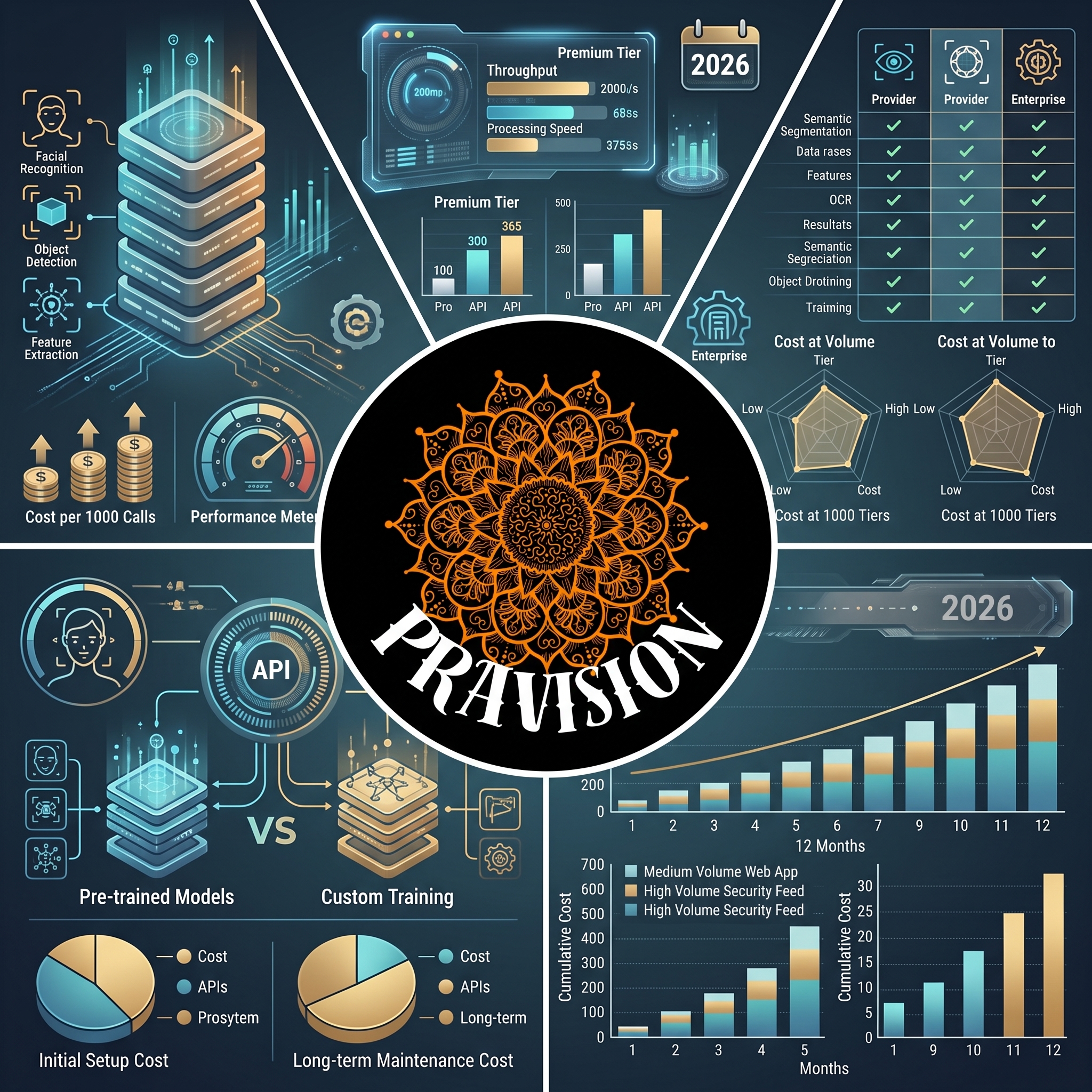
Prravision API platform infographic comparing pricing tiers, features, performance metrics, and cost analysis for 2026 with facial recognition, object detection, and custom training capabilities.

Choosing the right computer vision API can be challenging, especially when navigating the complex landscape of pricing models. This comprehensive computer vision API pricing comparison guide breaks down the costs, features, and value propositions of leading providers in 2026, helping you make an informed decision that aligns with your technical requirements and budget constraints.

Whether you’re building an e-commerce image recognition system, developing autonomous vehicle technology, or implementing facial recognition for security applications, understanding the pricing structures of major computer vision APIs is essential for project planning and long-term scalability.

Understanding Computer Vision API Pricing Models

Before diving into specific provider comparisons, it’s important to understand the common pricing structures you’ll encounter in the computer vision API market. Most providers use one or more of the following models:

  • Pay-per-request: You’re charged for each API call, with prices typically decreasing at volume tiers
  • Monthly subscriptions: Fixed monthly fees with included request quotas
  • Freemium models: Free tiers with limited requests, then paid upgrades
  • Enterprise custom pricing: Negotiated rates for high-volume users
  • Feature-based pricing: Different rates depending on which vision capabilities you use

The optimal pricing model depends on your usage patterns, transaction volume, and whether you need consistent baseline access or have variable demand. Many developers start with freemium tiers during development and prototyping, then transition to paid plans as their applications scale.

Major Computer Vision API Providers: Detailed Pricing Breakdown

Google Cloud Vision API

Google Cloud Vision remains one of the most comprehensive options in 2026, offering features like label detection, face detection, OCR, and explicit content detection. Their pricing structure includes:

  • Free tier: 1,000 units per month across most features
  • Label detection: $1.50 per 1,000 images (first 1M/month), decreasing to $0.60 for volumes over 5M
  • OCR: $1.50 per 1,000 images with similar volume discounts
  • Face/landmark detection: $1.50 per 1,000 images
  • Product search: Higher rates at $2.50-$3.75 per 1,000 images depending on volume

Google’s strength lies in its integration with the broader Google Cloud ecosystem and consistent performance across diverse image types.

Amazon Rekognition

Amazon’s computer vision service offers competitive pricing with strong integration into AWS services. Current 2026 pricing includes:

  • Free tier: 5,000 images per month for the first 12 months
  • Image analysis: $1.00 per 1,000 images (first 1M/month), dropping to $0.40 for over 10M
  • Face detection/analysis: $1.00 per 1,000 images processed
  • Custom labels: $4.00 per hour for training, plus $4.00 per 1,000 inference images
  • Video analysis: Separate pricing at $0.10 per minute analyzed

Amazon Rekognition excels for organizations already invested in the AWS ecosystem, offering seamless integration with S3, Lambda, and other AWS services.

Microsoft Azure Computer Vision

Microsoft Azure provides robust computer vision capabilities with transparent pricing tiers updated for 2026:

  • Free tier: 5,000 transactions per month with rate limits
  • Standard tier: $1.00 per 1,000 transactions (0-1M), decreasing to $0.65 for 1M-10M, and $0.40 for over 100M
  • Spatial analysis: $0.07 per camera per hour for real-time video analytics
  • Custom Vision: Separate training costs at $2 per hour, plus prediction costs

Azure’s computer vision services integrate particularly well with Microsoft’s enterprise offerings and provide strong support for on-premises deployment scenarios.

Clarifai

Clarifai focuses on customizable AI models with flexible pricing that has evolved significantly in 2026:

  • Community tier: Free with 1,000 operations per month
  • Essential: Starting at $30/month for 3,000 operations
  • Professional: Custom pricing based on volume and features
  • Operations pricing: Varies by model complexity, typically $0.40-$2.40 per 1,000 operations

Clarifai stands out for businesses requiring highly customized models and industry-specific computer vision applications.

Computer Vision API Pricing Comparison: Key Factors Beyond Cost

When conducting a thorough computer vision API pricing comparison, the sticker price is only one consideration. Several other factors significantly impact total cost of ownership and value:

Accuracy and Performance

A cheaper API that requires multiple attempts to achieve acceptable accuracy may ultimately cost more than a premium service with higher first-pass success rates. Benchmark testing with your specific image types is crucial before committing to a provider.

Feature Coverage

Some providers excel at specific tasks. If you need multiple capabilities (OCR, object detection, and facial recognition), bundling with a single provider may offer better value than mixing services, despite potentially higher per-feature costs.

Latency and Reliability

For real-time applications, API response times and uptime guarantees matter significantly. Enterprise SLAs typically cost more but provide guaranteed performance levels critical for production applications.

Data Privacy and Compliance

GDPR, CCPA, and industry-specific regulations may require specific data handling practices. Providers offering on-premises deployment or enhanced privacy features often charge premium rates but may be necessary for compliance.

Cost Optimization Strategies for Computer Vision APIs

Regardless of which provider you choose, implementing these strategies can significantly reduce your computer vision API costs:

  • Batch processing: Group image processing requests when real-time results aren’t required
  • Image preprocessing: Optimize image sizes and formats before API calls to reduce processing costs
  • Caching results: Store and reuse results for duplicate or similar images
  • Tiered feature usage: Use less expensive basic detection first, then call advanced features only when needed
  • Volume commitment: Negotiate annual contracts for predictable savings on high-volume usage
  • Multi-provider strategy: Use different APIs for different tasks based on pricing and accuracy sweet spots
  • Edge processing: Consider on-device computer vision for high-volume scenarios to eliminate per-request costs

Many organizations find that a hybrid approach—combining cloud APIs for complex tasks with on-device processing for simpler operations—delivers optimal cost-performance balance.

Emerging Trends in Computer Vision API Pricing for 2026

The computer vision API landscape continues evolving rapidly. Several trends are shaping pricing strategies in 2026:

Specialized model pricing: Providers increasingly offer industry-specific models (medical imaging, retail, manufacturing) with premium pricing reflecting specialized training data and higher accuracy for niche applications.

Sustainability-based pricing: Some providers now offer pricing incentives for using energy-efficient inference endpoints and carbon-neutral processing regions as environmental concerns influence technology purchasing decisions.

Real-time processing premiums: As edge computing and 5G enable more real-time computer vision applications, providers are differentiating pricing between batch and real-time processing, with premiums for guaranteed low-latency responses.

Custom model training democratization: Training costs for custom models have decreased significantly, making specialized computer vision more accessible to smaller organizations and startups.

Making Your Computer Vision API Pricing Decision

When finalizing your computer vision API selection, create a weighted scorecard evaluating:

  • Base pricing aligned with your expected monthly volume
  • Feature completeness for your specific use cases
  • Performance benchmarks using your actual image data
  • Integration complexity with your existing technology stack
  • Scalability as your application grows
  • Support quality and documentation comprehensiveness
  • Compliance with your regulatory requirements

Remember that the cheapest option rarely proves most cost-effective long-term. Factor in developer time, maintenance overhead, and opportunity costs when comparing providers. Many successful implementations start with proof-of-concept testing across 2-3 providers using real production data before making final commitments.

The computer vision API pricing comparison landscape in 2026 offers more choices and better value than ever before, with major providers competing aggressively on both features and cost. By thoroughly understanding your requirements, testing thoroughly, and selecting the provider that best aligns with your technical and business needs, you can implement powerful computer vision capabilities while maintaining cost efficiency.

Frequently Asked Questions

What is the cheapest computer vision API in 2026?

While pricing varies by usage patterns, Clarifai’s Community tier and Google Cloud Vision’s generous free tier (1,000 requests/month) offer the lowest entry points. For production volumes, Amazon Rekognition often provides the best value for basic image analysis at $1.00 per 1,000 images for moderate volumes, decreasing significantly at scale.

Do computer vision APIs charge for failed requests?

Most major providers (Google, Amazon, Microsoft, Clarifai) only charge for successfully processed requests. However, improperly formatted requests that consume server resources may count toward rate limits. Always review each provider’s specific billing policies, as practices vary for timeout errors and partial processing scenarios.

Can I switch computer vision API providers without major code changes?

Switching providers typically requires moderate development effort, as each API has unique request formats, response structures, and authentication methods. However, abstracting your computer vision calls behind a service layer during initial development minimizes switching costs. Consider multi-provider support from the start if vendor flexibility is important.

Are there open-source alternatives to commercial computer vision APIs?

Yes, open-source frameworks like OpenCV, TensorFlow, and PyTorch enable self-hosted computer vision without per-request fees. However, you’ll incur infrastructure costs, model training expenses, and significant development time. Commercial APIs typically offer better value unless you have very high volumes (millions of requests monthly) or highly specialized requirements.

How do I estimate my monthly computer vision API costs?

Start by estimating your monthly image processing volume, then identify which specific features you’ll use (basic labeling costs less than specialized analysis). Most providers offer pricing calculators on their websites. For new applications, monitor actual usage during beta testing—costs often differ significantly from initial estimates as real user behavior emerges.
Revitalizing Your Mission

AI Blog Poster

9 Pillars of High-Impact Nonprofit Web Design

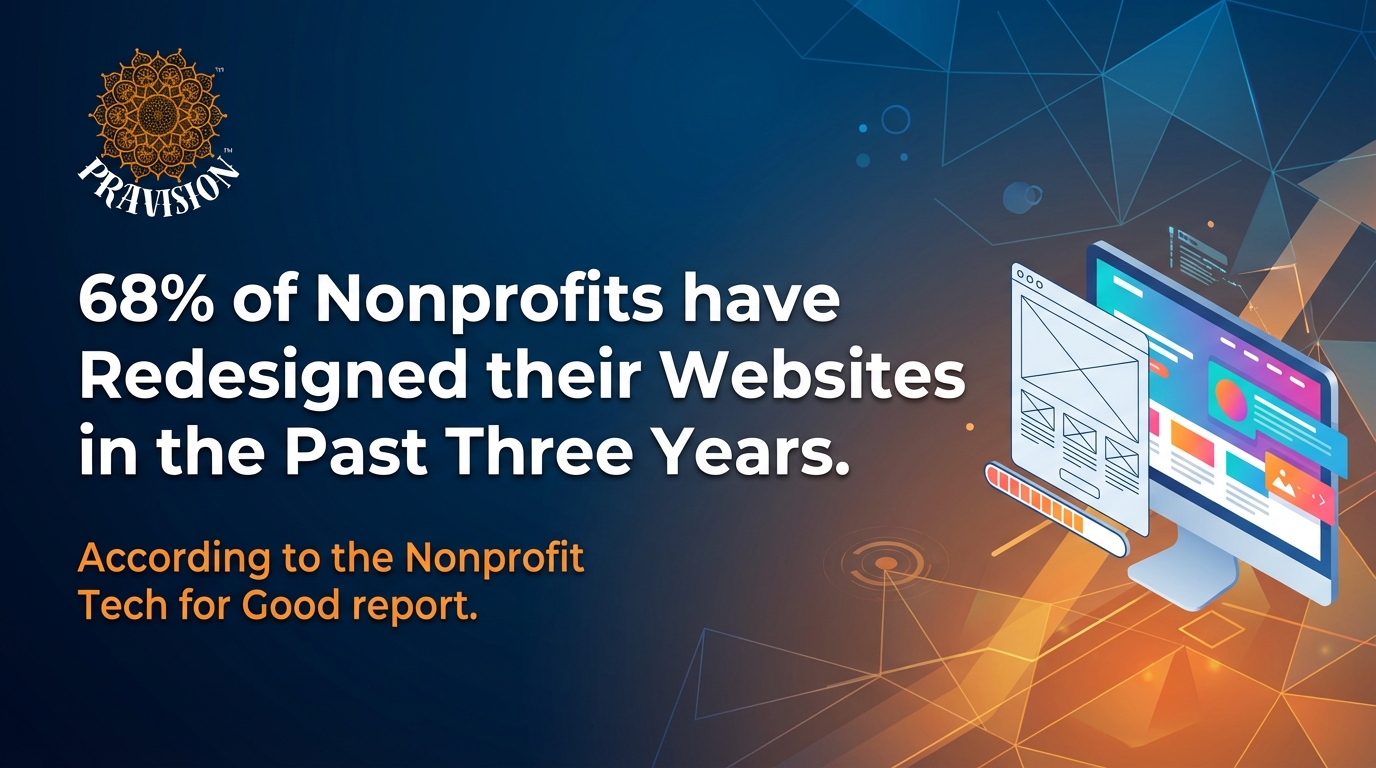
If you’ve been feeling the itch to refresh your nonprofit website, you are in good company. The digital landscape is shifting rapidly, and organizations are moving quickly to keep up. According to the Nonprofit Tech for Good report, 68% of nonprofits have redesigned their websites in the past three years.

Why the rush to redesign? Because in the nonprofit sector, we know what works and what doesn’t. A stagnant site is a missed opportunity for impact. At Pravision™, we don’t just build websites; we engineer digital growth. By applying specific architectural and design principles, we have helped our nonprofit clients increase page views per session by 35%.

If you are ready to transform your digital presence, here are the 9 core principles of nonprofit web design that drive engagement, donations, and trust.

1. Zero-Friction UX (Simple UX)

Pravision Metric: Systemic Efficiency

The modern donor has a short attention span. To capture it, we must eliminate technical noise to ensure a high-efficiency flow. We focus on a “clean-slate” user experience. This means ensuring that supporters can navigate your mission intuitively, removing any distractions or clutter that stand between a visitor and your cause. When friction reaches zero, engagement skyrockets.

2. Universal Digital Architecture (Accessible Content & Forms)

Pravision Metric: Inclusive Reach & Compliance

Accessibility is not a “nice-to-have”—it is a non-negotiable technical standard. Legal regulations, such as the Americans with Disabilities Act (ADA), require websites to be accessible to all visitors. We engineer content and forms with zero-defect precision, ensuring your site is fully compliant for every individual.

Furthermore, we believe data management shouldn’t require a computer science degree. With the Pravision™ Console, form submissions can be easily monitored with absolutely no knowledge of code, putting the power of data back in your hands.

3. Strategic Conversion Triggers (Inspiring CTAs)

Pravision Metric: High-Intent User Conversion

“Submit” and “Click Here” are artifacts of the past. We bypass generic buttons in favor of Inspiring CTAs. By leveraging audience sentiment, we craft calls-to-action that resonate emotionally. This approach transforms passive visitors into active stakeholders, driving measurable digital growth.

4. Narrative Engineering (Compelling Storytelling)

Pravision Metric: Bespoke Digital Roadmap

Your organization is unique, so why use a template built for everyone else? We bypass generic layouts to build a Bespoke Digital Narrative. We transform your organization’s impact into a compelling roadmap that highlights the problem, the solution, and the donor’s critical role. This ensures your story is told with data-driven precision, leading the user on a journey rather than just presenting them with text.

5. Visionary Creative Synergy (Creativity)

Pravision Metric: Re-Imagine Excellence

At Pravision™, creativity is where expert engineering meets artistic vision. We re-imagine the nonprofit space by designing unique, high-performance frameworks. Our goal is to captivate audiences and differentiate your brand from the standard, template-heavy sites that saturate the market. Your mission deserves a design as unique as the work you do.

6. Architectural Navigation (Logical Structure)

Pravision Metric: Systemic Alignment

We treat your site’s logical structure as a unified ecosystem. By organizing information into an intuitive hierarchy, we ensure visitors can audit your programs and impact with speed and clarity. A clear structure reflects a professional digital infrastructure, proving to your donors that you are organized and efficient.

7. Core-Identity Consistency (Uniform Branding)

Pravision Metric: Brand Integrity

Trust is built through visual alignment. If your branding changes from page to page, you lose credibility. We ensure Uniform Branding across every pixel of your site. This consistency reinforces your professionalism and ensures a “Transparent Partnership Model” with donors who expect reliability and stability.

8. High-Performance Visuals (Engaging Visuals)

Pravision Metric: Quality Assurance

A picture is worth a thousand donations. We deploy precision-crafted engaging visuals—including high-quality photography and optimized video—that provide an immediate emotional impact. These assets serve as the system validation of your work, proving your real-world impact through high-fidelity media.

9. Scalable Funding Engines (Convenient Donation Page)

Pravision Metric: Optimized ROI Models

The Convenient Donation Page is your engine for growth. If a donor decides to give, nothing should stop them. We integrate streamlined workflows and modern payment options to minimize abandonment. We ensure that the final stage of the user journey is as frictionless and efficient as possible, maximizing your ROI.

Why Partner with an Agency?

As a nonprofit marketing professional, you might have plenty of creative and innovative web design ideas buzzing around in your head, but no clear picture of how to implement them. The gap between vision and execution is where many internal teams struggle.

That’s why working with a specialized web design and development agency is often the best way for nonprofits to fully optimize their websites.

Agencies like Pravision™ help manage your website redesign process using years of experience, best practices, and visitor research to guide the way. We support your nonprofit website development and design from start to finish, offering key services including:

  • User Research and Content Strategy: Understanding who your donors are and what they need.

  • Website Design and Development: Custom coding and bespoke visuals.

  • Accessibility Optimization: Ensuring ADA compliance and inclusivity.

  • Ongoing Support: Technical help when you need it most.

The Continuous Improvement Approach

Working with Pravision™ allows you to adopt a continuous improvement approach for your website. The internet evolves every day, and your site should too. We keep your platform updated and effective as best practices evolve, ensuring your website is positioned for long-term growth.

Whether your goal is growing your advocacy efforts or increasing your online donor audience, we design to achieve your specific objectives.

Ready to build a website that works as hard as you do? Schedule Your Demo with Pravision to re-imagine your digital excellence together.

Stopping the Checkout Drop-Off

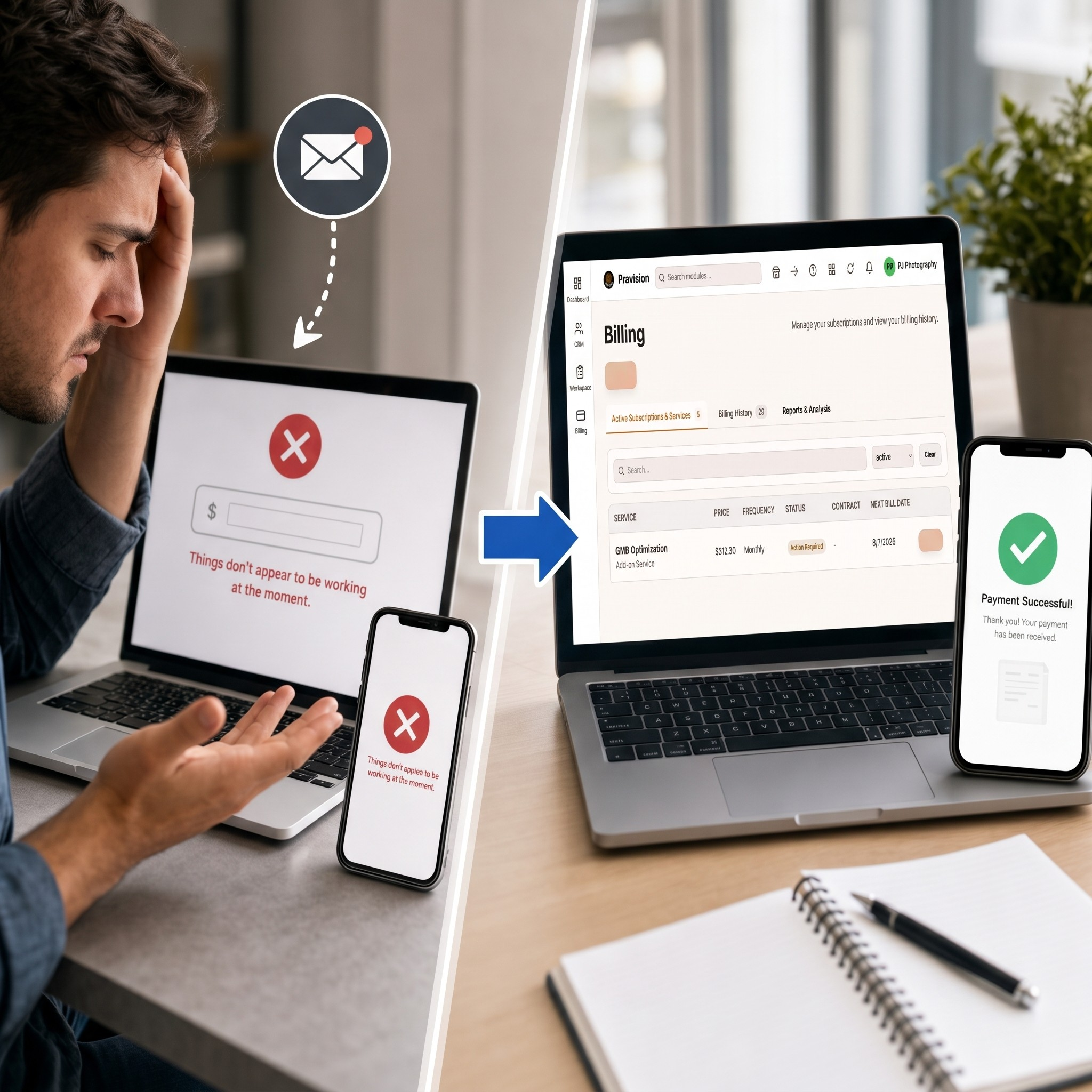
Man troubleshooting payment error on laptop receives email notification, leading to successful billing page and payment confirmation on multiple devices.

How Pravision Billing Fixes Broken Invoicing

We’ve all been there. You’re ready to pay a vendor, you open their invoice email, click the payment link, and immediately hit a brick wall.

Instead of seeing a clear, itemized order summary, you get kicked to a generic payment screen with zero context. No line items, no tax breakdown—just a blank field asking you to manually type in the dollar amount per unit. You try entering the full total, hit submit, and get slapped with an error: “Things don’t appear to be working at the moment.” You try again on your phone, but it fails there, too.

This exact scenario happened to a merchant trying to order wholesale packaging this week. The result? Total frustration, wasted time, phone calls back and forth with the vendor, and a delayed order.

If your business relies on payment links like this, scenes like this are quietly killing your conversion rates and straining your client relationships. Here is why these legacy setups fail and how modern billing fixes them.

Where Old-School Payment Links Go Wrong

When payment processes rely on custom buttons or raw link generators pasted into emails, a few major points of failure tend to pop up:

  • Zero Transaction Details: When a customer opens a payment link, they expect to see what they are paying for. A blank form destroys trust and forces them to dig back through old email attachments to double-check amounts.

  • The Manual Input Trap: Asking customers to calculate or key in their own totals introduces easy user errors and leads to declined authorizations.

  • Cross-Device Glitches: Outdated payment scripts frequently break across mobile browsers or pop-up blockers, stranding buyers on dead-end error pages.

The Modern Fix: Streamlining the Invoicing Experience

Upgrading to a dedicated platform like Pravision Billing removes technical guesswork for both you and your buyers through a unified, simple flow:

  • One-Time Setup: Instead of creating manual payment links for every transaction, Pravision Billing connects directly to your platform once. Whether you send a single invoice or set up recurring billing, the system handles the backend heavy lifting automatically.

  • Full Line-Item Transparency: When your client opens their payment link, they do not see an empty input box. They get a clean, branded invoice showing itemized product descriptions, exact quantities, shipping, tax, and the final total.

  • A Fast Two-Click Checkout: The entire payment takes seconds:

    1. Click 1: The buyer clicks the secure link in their email or text to review their pre-filled invoice.

    2. Click 2: They tap Pay Now to complete the purchase securely via credit card, ACH, or digital wallet—getting an instant confirmation right on screen.

Invoicing as a Competitive Advantage

Your payment process is often the final interaction a client has with your business. Leaving them to navigate broken redirects or manual calculations creates unnecessary friction right at the finish line.

By swapping out clunky payment links for transparent, automated, two-click invoicing, you make it effortless for customers to pay you—and get money into your account faster.

Ready to turn your invoicing into a seamless, modern experience? Stop losing time and revenue to clunky, error-prone payment links.

Schedule Your Demo with Pravision to see how our two-click billing solution can automate your payments, eliminate checkout friction, and get you paid faster.


Image Gallery

Pravision AI Bookkeeping & Finance Module: Complete Overview

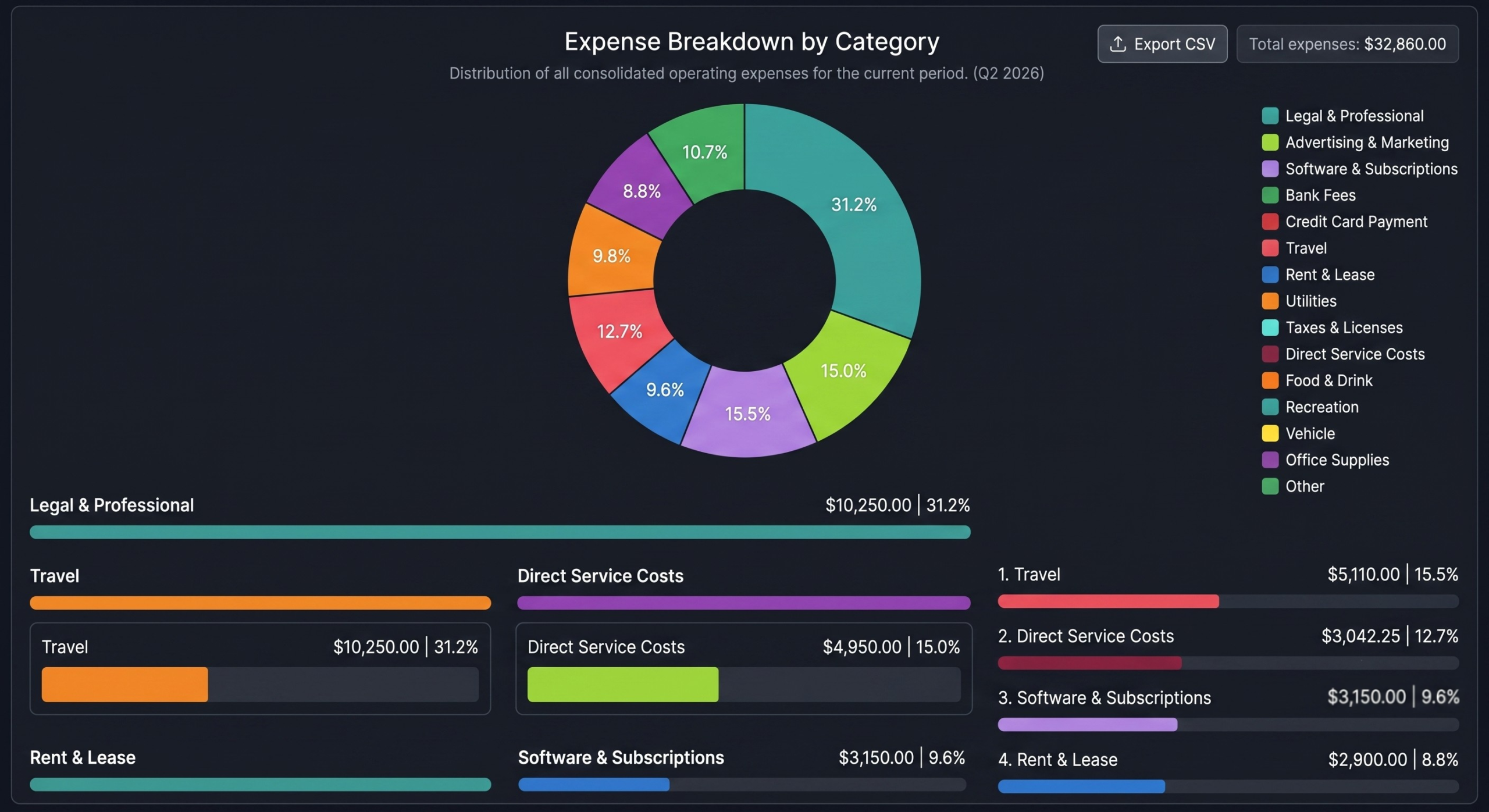
Donut chart showing Q2 2026 expense breakdown by category, with Legal & Professional at 31.2% ($10,250), Advertising & Marketing at 15.0% ($4,950), and nine other categories displayed in colored segments and detailed bars below.

What is the Pravision AI Bookkeeping & Finance Module?

The Pravision AI Bookkeeping & Finance Module is a financial management engine built directly inside the Pravision Console. It automatically captures, categorizes, and analyzes company financial data in real time, eliminating the need for separate accounting software or manual data entry.

Designed for freelancers, agencies, and small businesses, it delivers clear financial intelligence without the complexity or per-transaction fees of traditional platforms.

What Key Problems Does This Module Solve?

1. Unexpected Charges and Per-Scan Fees

Unlike competing platforms that charge extra or limit the number of receipts you can scan per month, Pravision includes unlimited AI receipt scanning in your standard subscription. You never have to worry about unexpected usage fees just to keep your books updated.

2. Manual Data Entry & Missing Transactions

Instead of manually typing transaction details or logging into bank portals to copy numbers, the system connects directly to your major bank and credit accounts. Transactions load automatically in real time, while physical receipts can be snapped or uploaded for instant matching.

3. Disconnected CRM & Financial Records

In traditional setups, client accounts and financial transactions live in separate apps. Pravision AI links synced bank transactions and scanned expenses directly to your CRM, giving you a full view of client-related project costs.

4. Mixed Business and Personal Expenses

Co-mingling personal transactions with company spending creates major headaches during tax season. The module tracks personal expenses separately, automatically excluding them from business reports and tax-deductible totals.

Core Capabilities of the Module

  • All-Inclusive Pricing: Includes unlimited receipt scanning, bank feeds, and reporting under one flat subscription. Eliminates surprise per-scan fees and tiered add-ons.

  • Auto-Synced Bank Transactions: Connects securely to your major bank and credit card accounts to automatically fetch and load incoming transactions. Keeps your books updated in real time with zero manual data entry or missed charges.

  • AI-Powered Receipt Scanning: Upload a receipt image, and the AI extracts the merchant, amount, date, and category automatically. Eliminates manual receipt logging and connects physical spending directly to your CRM.

  • Smart Expense Categorization: Automatically organizes expenses into standard buckets (like Advertising, Digital & Tech, Professional Services, Operations, and Logistics). Keeps your general ledger organized for effortless tax preparation.

  • Project-Based Tracking: Assigns costs to specific client projects with built-in budget progress bars. Prevents project cost overruns and monitors profitability in real time.

  • Period-Based Reporting: Filters financial metrics by monthly, quarterly, yearly, or all-time views with visual analytics. Gives owners instant visibility into financial trends at any stage.

  • Business vs. Personal Separation: Filters out personal expenses from official business statements. Protects tax deductions and maintains clean, audit-ready books.

  • Subscription Monitoring: Tracks recurring software fees, monthly costs, annual projections, and upcoming renewal dates. Eliminates surprise charges and stops unnecessary software sprawl.

  • CSV Export & Audit Trail: Maintains a complete transaction log with one-click export functions. Allows seamless sharing with CPAs, accountants, or tax advisors.

Frequently Asked Questions

Are there extra charges for scanning receipts?

No. Unlike other financial management software that charges per scan or caps your monthly receipts, Pravision AI includes unlimited receipt scanning as part of the core module at no extra cost.

How does automatic transaction fetching work?

You can securely connect your primary business bank accounts and credit cards to Pravision. Once connected, the module automatically imports and categorizes transactions as they settle, keeping your balance and spending metrics up to date without manual uploads.

Do I need accounting experience to use this module?

No. The system translates raw financial data into clear charts, category breakdowns, and simple status bars, allowing business owners to understand their financial standing without knowing complex accounting rules.

How does project-based tracking work?

When a transaction fetches or a receipt is logged, you can tag it to a specific client project. The module tracks spending against your set budget and shows visual progress indicators so you know if a project stays profitable.

Can I share my financial reports with my accountant?

Yes. The module includes a complete transaction audit trail and allows you to export your data to CSV format at any time for tax preparation or external accounting reviews.

How does the system handle recurring software subscriptions?

The subscription monitoring tool evaluates your synced accounts to identify active recurring payments, calculate your annual subscription projections, and alert you to upcoming payment dates.

Summary

The Pravision AI Bookkeeping & Finance Module gives freelancers, agencies, and small businesses all-inclusive access to automated bank transaction syncing, unlimited AI receipt processing, smart expense categorization, and real-time financial tracking without hidden fees.

👉 Schedule a Demo of the Pravision Console


Image Gallery

The Hidden Reason Your Website Isn’t Getting Traffic

Laptop displaying 404 error with warning icon and broken link, magnifying glass examining HTML code, security and malware warning icons floating above.

The Hidden Reason Your Website Isn’t Getting Traffic (And How to Fix It in 5 Minutes)

You’ve spent weeks, maybe months, building your website. You designed a beautiful layout, tweaked the copy until it sounded perfect, and launched your business to the world. Then, you opened your analytics dashboard, waited for the traffic to roll in, and… nothing. Total silence.

If your website isn’t ranking on the first page of Google, it’s easy to feel like you’re shouting into an empty void.

When organic traffic flatlines, most business owners immediately fall into a few common traps. They assume they need to write 50 more blog posts, change their entire social media strategy, or hand over thousands of dollars to a sketchy SEO agency that promises the world but delivers empty reports.

But more often than not, the problem isn’t your content, your product, or your social media. The real culprit is a handful of invisible, technical glitches buried deep inside your website’s backend code. These glitches act like digital brick walls, completely blocking search engine bots from understanding who you are.

The good news? You don’t need a computer science degree to find and fix them. You just need to know how to look at your site through the eyes of an algorithmic crawler.

The Invisible Roadblocks: Why Google is Ignoring You

To understand why your traffic isn’t growing, you have to understand how Google actually works. Google doesn’t hire millions of people to manually read every website on the internet. Instead, it deploys smart software programs called “crawlers” or “bots.”

These bots constantly surf the web, reading code, analyzing structures, and cataloging pages. Their job is to build a massive map of the internet so that when someone types a question into the search bar, Google can instantly serve up the best answer.

But crawlers are impatient. If they hit a technical roadblock while trying to scan your website, they don’t sit around trying to solve the puzzle. They simply give up, leave your site, and move on to your competitor’s page. When they leave, your rankings tank.

Here are the three massive technical areas where websites usually break down:

1. Indexation and Crawlability (The Open Door)

Think of your website like a house. Your sitemap is the blueprint, and your code forms the hallways. If a developer accidentally leaves a snippet of code that tells bots “do not index this page,” or if your links lead to dead ends (404 errors), Google’s bots get trapped in a room with no doors. If they can’t crawl a page, that page literally does not exist in search results.

2. User Experience and Speed (The Need for Velocity)

Google is obsessed with user satisfaction. If your website takes more than two or three seconds to load—usually due to unoptimized scripts, uncompressed video backgrounds, or massive image files—users will hit the “back” button. Google tracks this behavior. If people flee your site the second they land on it, Google assumes your site is low quality and pushes you down the search results page.

3. Essential Metadata (The Digital Billboard)

When you search for something on Google, every result has a blue title and a short paragraph beneath it. That short paragraph is called a meta description. If your website is missing a meta description, Google has to guess what your page is about, often pulling random text from your sidebar or footer. This makes your search listing look broken and unprofessional, ensuring that even if you do show up on page one, nobody clicks your link.

What Actually Happens During an SEO Audit?

An SEO audit is essentially a comprehensive health checkup for your digital storefront. Just like a mechanic plugs a diagnostic scanner into your car’s dashboard to instantly read the engine’s hidden error codes, an automated audit checks every single ranking factor on your website simultaneously.

Instead of throwing a wall of confusing data at you, a modern audit breaks your site’s performance down into actionable pillars:

  • Technical Checks: Instantly flags missing meta descriptions, broken internal links, and configuration bugs.

  • Performance and Mobile Optimization: Tells you exactly how fast your site loads on mobile phones versus desktop computers.

  • Authority and Presence: Measures your local search footprints and estimates how much trust your site has earned across the wider web ecosystem.

Stop Guessing: Scan Your Site with Pravision in 60 Seconds

You shouldn’t have to spend a fortune on marketing retainers just to find out why your website isn’t showing up on page one. True optimization shouldn’t be a luxury reserved only for giant corporations with dedicated engineering teams.

To level the playing field, the development team at Pravision built a completely free, automated diagnostic scanner.

By heading over to the Pravision SEO Audit Tool, you can paste your URL into the search bar and watch our system analyze your entire site architecture in real time.

Instead of dumping an intimidating, 50-page spreadsheet of data into your lap, the tool generates a clean, interactive scorecard. You’ll get a clear health score out of 100, a breakdown of your technical elements, and an AI Strategic Summary that cuts through the noise.

For example, if your site has a critical error—like a missing meta description on your homepage—the platform won’t just tell you that it’s missing. The built-in AI assistant will provide clear, recommended actions, such as advising you on how to write a compelling description to boost your click-through rate, or suggesting specific plugins (like Yoast SEO or Rank Math) if you are running on WordPress.

Turn Your Errors into an Actionable Growth Roadmap

An error code on a screen isn’t bad news; it’s a massive growth opportunity. Every single technical issue you fix removes a barrier between your business and a potential customer.

Once you run your diagnostic scan on the platform, you have a perfect, step-by-step to-do list. If you are comfortable working in your site’s backend, you can jump into your content management system and fix the title tags and image alt texts yourself in an afternoon. If you aren’t technical, you can simply hand the clean Pravision report directly to your web developer so they can patch the holes with zero guesswork.

Stop wondering why your competitors are winning the search race. Stop wasting time writing content that search engine crawlers can’t even find.

Claim your spot on page one, uncover your website’s hidden bottlenecks, and take total control of your traffic.

👉 Go to pravision.ai/seo-audit and run your free instant diagnostic scan today.

The Art of the Modern Ecosystem

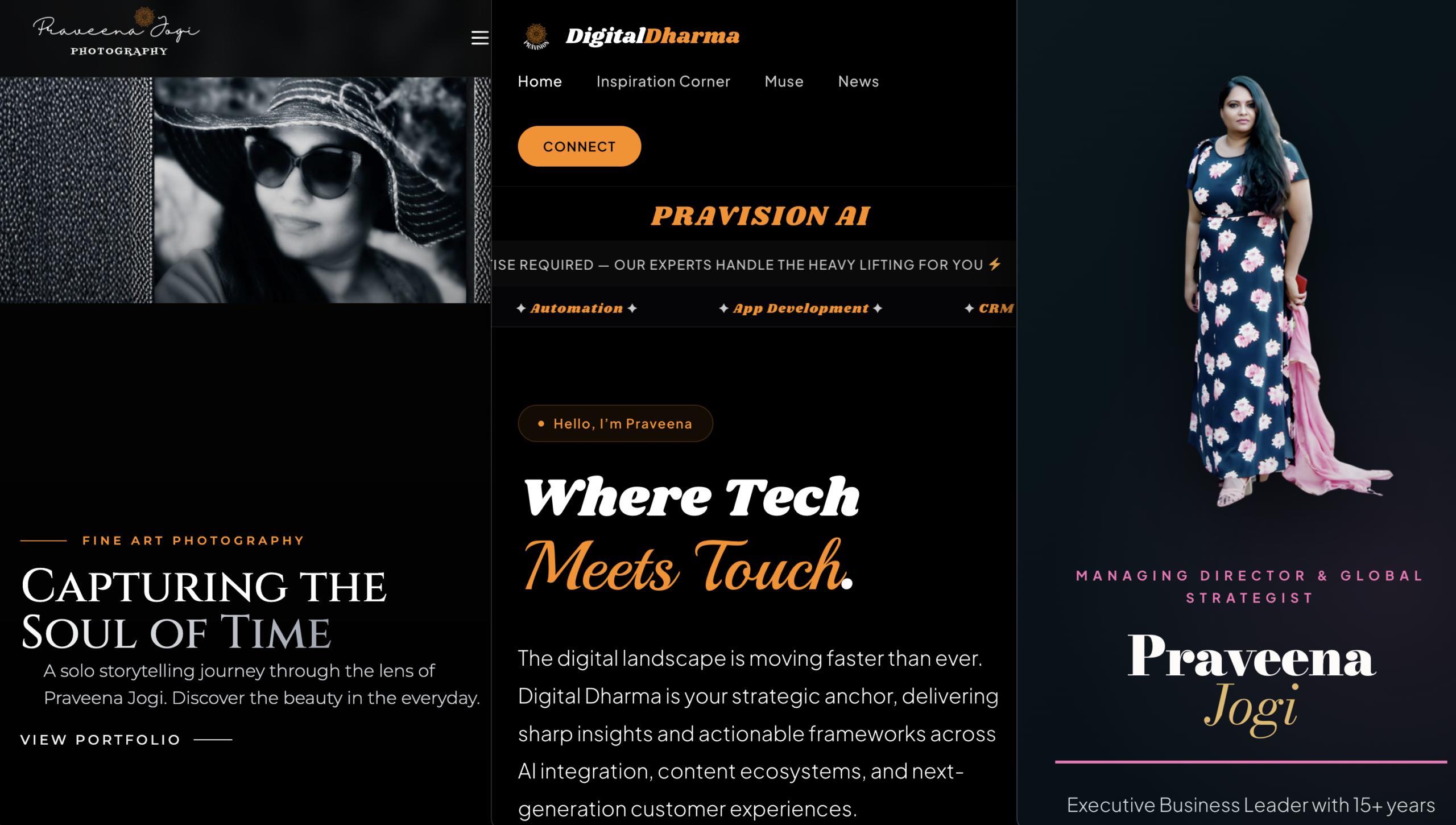
Website homepage featuring Praveena Jogi photography and Digital Dharma services with dark theme and orange accents

How Pravision LLC Architects Intentional Digital Experiences

Let’s be honest: in today’s fast-moving market, a website can’t just be an expensive digital business card. It needs to be the central heartbeat of your identity, a smooth operations engine, and an automated authority builder.

Even more critical is how search behavior is shifting under our feet. People aren’t just typing clunky keywords into a search bar anymore; they’re asking conversational AI systems complex, nuanced questions. If your web presence isn’t intentionally engineered for both human visitors and AI cogs alike, you’re essentially invisible.

At Pravision LLC, we don’t do template websites. We architect end-to-end digital ecosystems tailored for real-world discoverability. We mix high-end, bespoke styling with advanced SEO and AEO (Answer Engine Optimization) frameworks to make sure your brand stands out, whether a human or an algorithm is looking for you.

To show you exactly what happens when precision backend architecture meets avant-garde editorial design, let’s look under the hood of four distinct platforms designed, built, and optimized by Pravision LLC.

1. The High-Conversion One-Page Architecture: ipraveena.com

When it comes to capturing attention quickly, less is almost always more. For ipraveena.com, we designed a streamlined, single-page matrix. This specific blueprint is the gold standard for landing pages, high-converting marketing funnels, and executive resumes because it completely eliminates user distraction.

  • The Design Identity: Built on a deep obsidian teal canvas balanced by high-fashion runway pink and warm champagne gold accents, this platform reads like a modern premium business publication.
  • Kinetic Interaction: It features an advanced 3D kinetic runway container that breathes life into portrait imagery, capturing the visitor’s eye with elegant, sophisticated motion mechanics.
  • The Strategic Value: Rather than making prospects hunt through a complex menu, everything from core metrics to leadership history flows down a single, unbroken line. It guides the user from first impression straight to the calendar link.

Explore the Live Platform: Discover how we redefined the one-page presentation canvas at ipraveena.com.

3e55f53ca3b4a5be14014bc635d6339fc3bf60901a4bc8106230e9c3a0861387

Visual Concept: The sleek, magazine-cover header architecture of ipraveena.com.

2. The Thought Leadership & Media Publication: digitaldharma.pravision.com

A brilliant modern corporate framework requires a dedicated content ecosystem to nurture audience trust. Digital Dharma is Pravision’s premium publication platform, meticulously engineered to host curated perspectives on life, technology, and business strategy.

  • Dual-Pillar Blueprint: The site elegantly partitions content between Mindful Empowerment (cultivating mental resilience and women’s empowerment) and Strategic Infrastructure (sharp insights across AI deployment and next-gen customer experience models).
  • Typography & Scannability: Engineered for deep textual clarity with high-contrast font hierarchies, ensuring that lengthy, frameworks-heavy analysis remains clean and highly scannable on any screen size.
  • AEO Integration: The underlying semantic code structure is meticulously organized so that large language models (LLMs) and conversational search engines can cleanly index, extract, and reference its thought leadership content.

Explore Curated Perspectives: Engage with deep-dive frameworks and insights at digitaldharma.pravision.com.

Digital Dharma – Pravision

Visual Concept: Digital Dharma’s twin-engine thought leadership grid array.

3. The Professional Creative Studio Portfolio: pj4ever.com

Creative websites often suffer from visual clutter or slow loading speeds due to heavy asset sizes. For PJ4EVER Photography, we designed a fast, cinematic, and deeply inspiring visual canvas that prioritizes emotional resonance over standard structural noise.

  • The Core Message: Built around an empowering artistic philosophy tailored to motivate women: size does not matter, and you don’t need to be a traditional model. All that is required is an authentic smile, perfect angles, and raw happiness to yield the flawless image.
  • Multi-Channel Media Pipeline: Features an interface that cleanly bridges the central photography hub with secondary portfolio feeds across social environments.
  • Performance Engineering: Fully optimized asset delivery pipelines ensure that high-resolution photography loads with near-zero latency, maintaining a fluid user journey.

Experience the Creative Studio: View the art of empowering visual storytelling at pj4ever.com.

611c033089ac20f4213b0f330dc5338728005dd32fc7dce5e6240d24f21be7ef

Visual Concept: The sleek multi-channel integration block of pj4ever.com.

4. The Unified Enterprise Profile & Core Operations Hub: pravision.com

Your flagship company profile must be a powerful conversion engine. The corporate center of pravision.com is designed to demonstrate complete business authority, clear service transparency, and seamless customer capture.

  • BOS Standardization: Built to reflect the elite, standardized principles of our own Pravision Console Business Operating System, turning complex service layers into intuitive user paths.
  • Unified Client Access: Integrates clear pathways for our advanced digital ecosystems, including client management interfaces and centralized coordination systems.
  • Technical Prowess: Behind the luxury aesthetic sits a powerhouse of pristine clean code, absolute responsiveness across mobile arrays, and rapid caching configurations.

Witness Enterprise Scale: Review our full suite of digital business systems at pravision.com.