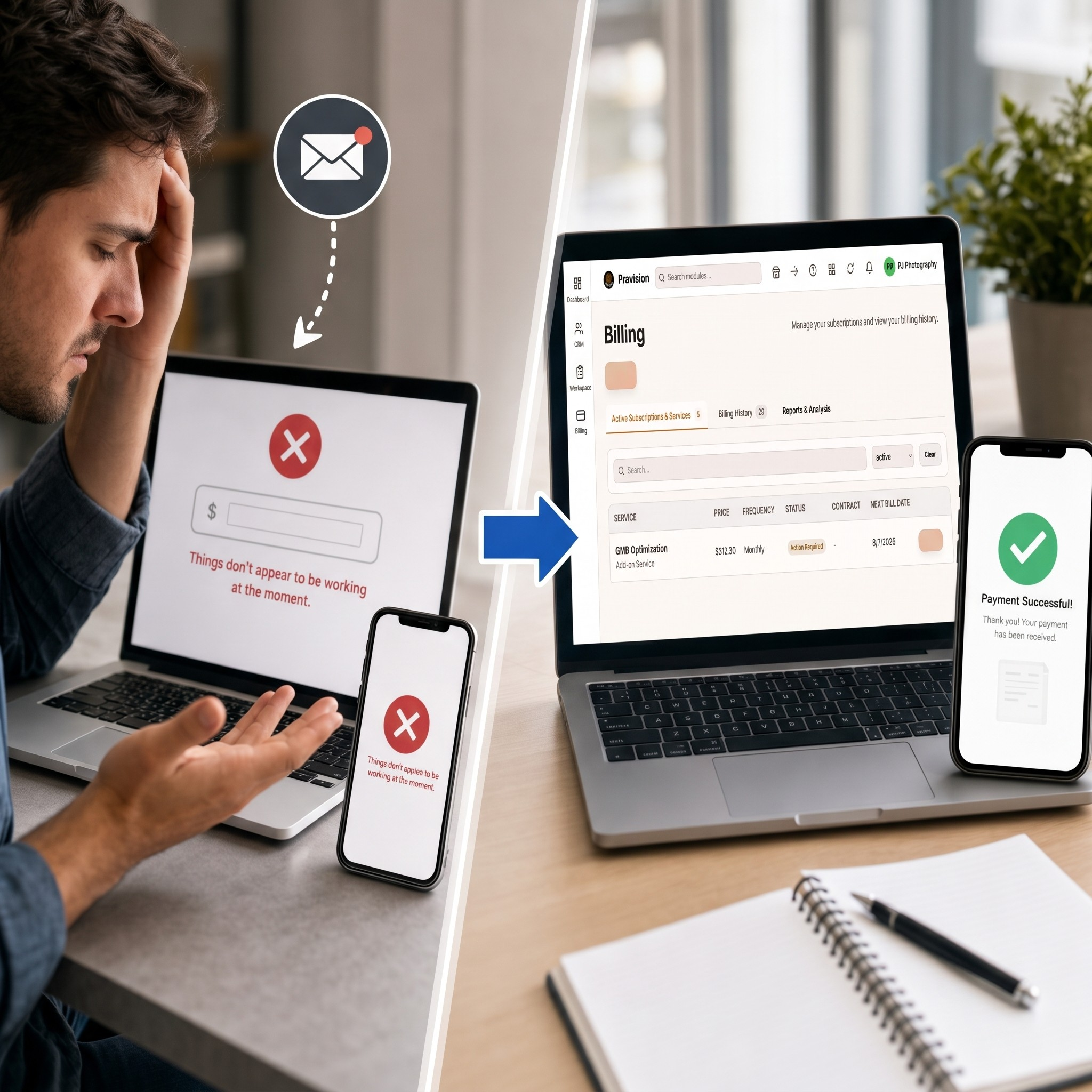
We’ve all been there. You’re ready to pay a vendor, you open their invoice email, click the payment link, and immediately hit a brick wall.
Instead of seeing a clear, itemized order summary, you get kicked to a generic payment screen with zero context. No line items, no tax breakdown—just a blank field asking you to manually type in the dollar amount per unit. You try entering the full total, hit submit, and get slapped with an error: “Things don’t appear to be working at the moment.” You try again on your phone, but it fails there, too.
This exact scenario happened to a merchant trying to order wholesale packaging this week. The result? Total frustration, wasted time, phone calls back and forth with the vendor, and a delayed order.
If your business relies on payment links like this, scenes like this are quietly killing your conversion rates and straining your client relationships. Here is why these legacy setups fail and how modern billing fixes them.
Where Old-School Payment Links Go Wrong
When payment processes rely on custom buttons or raw link generators pasted into emails, a few major points of failure tend to pop up:
Zero Transaction Details: When a customer opens a payment link, they expect to see what they are paying for. A blank form destroys trust and forces them to dig back through old email attachments to double-check amounts.
The Manual Input Trap: Asking customers to calculate or key in their own totals introduces easy user errors and leads to declined authorizations.
Cross-Device Glitches: Outdated payment scripts frequently break across mobile browsers or pop-up blockers, stranding buyers on dead-end error pages.
The Modern Fix: Streamlining the Invoicing Experience
Upgrading to a dedicated platform like Pravision Billing removes technical guesswork for both you and your buyers through a unified, simple flow:
One-Time Setup: Instead of creating manual payment links for every transaction, Pravision Billing connects directly to your platform once. Whether you send a single invoice or set up recurring billing, the system handles the backend heavy lifting automatically.
Full Line-Item Transparency: When your client opens their payment link, they do not see an empty input box. They get a clean, branded invoice showing itemized product descriptions, exact quantities, shipping, tax, and the final total.
A Fast Two-Click Checkout: The entire payment takes seconds:
Click 1: The buyer clicks the secure link in their email or text to review their pre-filled invoice.
Click 2: They tap Pay Now to complete the purchase securely via credit card, ACH, or digital wallet—getting an instant confirmation right on screen.
Invoicing as a Competitive Advantage
Your payment process is often the final interaction a client has with your business. Leaving them to navigate broken redirects or manual calculations creates unnecessary friction right at the finish line.
By swapping out clunky payment links for transparent, automated, two-click invoicing, you make it effortless for customers to pay you—and get money into your account faster.
Ready to turn your invoicing into a seamless, modern experience? Stop losing time and revenue to clunky, error-prone payment links.
Schedule Your Demo with Pravision to see how our two-click billing solution can automate your payments, eliminate checkout friction, and get you paid faster.
I’m dedicated to becoming a seamless extension of your team, immersing myself in your brand and working as your dedicated HubSpot expert. Whether it’s aligning with your time zone, using a branded email account, or embodying your company values, I’m ready to go the extra mile.
Here’s how I can help you leverage the power of HubSpot:
HubSpot Marketing Hub Expertise:
Landing page development: Create high-converting landing pages optimized for lead capture and conversions.
Website development: Build and manage websites using WordPress or the HubSpot CMS.
Audience segmentation and targeting: Define and target specific audience segments for personalized messaging.
PPC management and reporting: Manage and optimize your pay-per-click campaigns for maximum ROI.
Organic social media management: Develop and execute organic social media strategies to increase brand visibility and engagement.
Lead flow development: Streamline your lead generation process and optimize lead capture workflows.
Marketing automation: Set up and manage marketing automation workflows, including migration, permission sets, and custom workflows.
Lead nurturing: Develop and implement lead nurturing programs to guide leads through the buyer’s journey.
Custom lead lifecycles, scoring, and sources: Tailor HubSpot to your unique sales process with custom solutions for lead management.
Harnessing the Power of HubSpot Sales Hub
Deal Automation: Automate repetitive tasks and streamline your sales workflow for increased efficiency.
In-HubSpot Call Tracking: Track and analyze sales calls directly within HubSpot for valuable insights.
Email Tracking: Gain visibility into email opens and clicks to gauge prospect engagement.
Sales Sequences: Develop and implement automated email sequences to nurture leads and move them through the sales funnel.
Quotes & Products: Create and manage professional quotes and product catalogs within HubSpot.
Advanced Reporting: Build customized reports to track key sales metrics and performance.
Forecasting: Implement forecasting tools to predict future sales revenue and identify potential roadblocks.
Customer Service with HubSpot Service Hub
Website Development: Build a user-friendly and informative website that serves as a valuable resource for your customers.
Website Maintenance & Optimization: Ensure your website runs smoothly with ongoing maintenance, updates, and performance analysis.
Website Migration: Seamlessly migrate your existing website to HubSpot’s platform.
Content Creation: Utilize HubSpot’s drag-and-drop editor to create engaging and informative content.
CRM Integration: Leverage the power of a fully integrated CRM to gain a holistic view of your customers.
Reporting & Analytics: Track key metrics with contact attribution reporting, adaptive testing, and custom reports.
User Management: Manage user roles and permissions for enhanced security and control.
Security: Protect your website and customer data with a robust web application firewall.
Customer Communication: Utilize HubSpot’s intuitive Conversations platform to provide efficient and personalized support.
Streamlining Customer Service with HubSpot Service Hub
Ticketing:
Efficient setup and automation
Shared team inbox for collaboration
Customer Portal:
Empower customers with self-service options
Live Chat:
Real-time support
Integration with external platforms
Call Management:
Automatic call recording and logging to your CRM
Knowledge Base:
Develop a comprehensive knowledge base for self-service support
Feedback & Surveys:
Gather valuable insights with NPS and user experience surveys
Performance & Reporting:
Forecasting and customer support reports to track key metrics
Beyond the list:
I’m committed to understanding your specific needs and tailoring my services to achieve your marketing goals. Let’s discuss how I can help you maximize your HubSpot investment and drive business growth.
We’re thrilled to announce that Pravision has officially partnered with HubSpot! This exciting collaboration allows us to offer our clients even more powerful tools and strategies to achieve their marketing and sales goals.
Ever wonder how successful businesses seem to have it all together? Their marketing efforts are perfectly aligned with sales, customer service is a breeze, and everything runs like a well-oiled machine. The secret often lies in integrated business solutions. These solutions connect different parts of a business, like marketing software, e-commerce platforms, and CRM systems, allowing them to work together seamlessly. Think of it as building a dream team for your business, where everyone is in sync and working towards the same goal.
Developing Your Business Picture Perfectly
Now, let’s dive deeper. Running a business, no matter the size, is like creating a masterpiece photograph. You need the perfect composition, lighting, and focus to capture a stunning image. Integrated business solutions are your expert photo editor, ensuring every element works together harmoniously for a picture-perfect result.
Imagine this:
A potential customer discovers your captivating Instagram post (designed with Canva). Intrigued, they click the link in your bio, landing on a targeted landing page you built with HubSpot.
HubSpot CRM automatically captures their information and tracks their interactions with your website. You nurture them with personalized emails, showcasing relevant products and offers.
Ready to purchase, they head to your Shopify store. Inventory levels are updated in real-time, and payment processing is secure and seamless thanks to your integrated payment gateway.
A customer has a question? They reach out through your website’s live chat, and the conversation is automatically logged in HubSpot CRM, giving your team full context for a quick and helpful response.
You monitor your marketing campaigns and sales performance with HubSpot’s reporting tools, gaining valuable insights to optimize your strategies and drive further growth.
This is the power of integrated business solutions. They connect the dots between your different business functions, automating workflows, and empowering you to:
Sharpen Your Focus: No more wasted time switching between apps or searching for information.
See the Complete Picture: Gain a holistic view of your business performance, from marketing to sales to customer service.
Enhance Your Image: Deliver a consistent and personalized brand experience across all channels.
Develop with Precision: Scale your business smoothly, adapting to changes with ease.
Whether you’re a solopreneur or a growing team, integrated solutions like HubSpot CRM, Shopify, Mailchimp, and others can help you develop a thriving business.
Ready to frame your business success? Contact us today for a free consultation.
I’m excited to share the story of a recent project I completed for a nonprofit organization. The goal was to enhance their efficiency by setting up Google Workspace, including Google Voice and email services, and providing comprehensive training on how to use these tools effectively. Here’s how it all unfolded and the positive impact it had on the organization.
Understanding the Need
When the nonprofit organization reached out to me, they were facing challenges with their fragmented and inefficient communication and collaboration tools. They needed a cohesive digital environment to streamline their operations and support their mission of serving the community. I was eager to help them achieve this transformation.
Setting Up Google Workspace
The first task was setting up Google Workspace. I created account for the staff member, giving them access to essential tools like Gmail, Google Drive, Google Docs, Google Sheets, and Google Calendar. This unified platform was designed to enhance their internal and external communications, document management, and scheduling.
Overcoming Challenges with Google Voice
One challenge we faced was with Google Voice. The organization already had a Google Voice number, but it had been inactive for several years due to the pandemic. As a result, the number became inactive, and reclaiming it was not possible. It took some time, but I was able to secure a new number that the organization liked. This new number helped them get back in business, improving their communication capabilities significantly.
Configuring Email Services
I also set up professional email addresses for all team members, boosting the organization’s credibility and brand identity. The new email system ensured secure, reliable, and efficient communication, with features like spam protection and robust security measures. This allowed the nonprofit to focus on their mission without worrying about email-related issues.
Providing Comprehensive Training
Understanding that the successful adoption of new tools depends on user proficiency, I conducted extensive training sessions for the staff. The training covered:
Google Workspace Basics: How to navigate and use Gmail, Google Drive, Google Docs, Sheets, and Calendar effectively.
Google Voice Usage: Making and receiving calls, voicemail management, and using the service on various devices.
Email Management: Best practices for managing emails, utilizing labels and filters, and maintaining security.
These sessions were interactive and hands-on, ensuring that staff members felt confident and empowered to use these tools to their full potential.
Seeing the Impact
The transformation was immediate and profound. The nonprofit organization reported significant improvements in their day-to-day operations. Communication became more fluid, document collaboration was seamless, and scheduling was more efficient. The team appreciated the intuitive nature of Google Workspace and the flexibility provided by Google Voice.
One of the most rewarding aspects of this project was the positive feedback I received from their CEO. They expressed gratitude for the user-friendly tools and the comprehensive training that made the transition smooth. The leadership team highlighted the enhanced productivity and the positive impact on their ability to serve the community more effectively.
Reflecting on the Journey
You might think it would take a whole team or company to complete a project like this, but at Websiteistic, I, Praveena Jogi, was able to complete it within two weeks. If you’re looking to integrate Google Workspace, look no further. Contact me today at Websiteistic for an affordable price. You don’t need to break the bank or pay a full-time salary. We don’t outsource the job or project; everything is done by me, right here from the Bay Area. Call today to book your free consultation.
This project is a testament to the power of technology in transforming organizational efficiency and effectiveness. By setting up Google Workspace, integrating Google Voice, and providing thorough training, I was able to empower a dedicated nonprofit organization to better achieve their mission. I’m proud to have been a part of this journey and look forward to supporting more organizations in harnessing the power of digital tools for greater impact.
The Importance of Streamlining Payments for Baseball and Softball Tournaments
Efficient payment processes are crucial for baseball and softball tournaments, as they facilitate easy registration and ensure a smooth experience for participants, organizers, and sponsors. Streamlining payments can save time, reduce errors, and increase overall satisfaction for everyone involved.
How Websiteistic Delivers Seamless Solutions for Clients
Websiteistic’s expertise in innovative website design and cutting-edge technology enables the company to provide seamless solutions for clients. Our focus on understanding the client’s business, brand, and target audience, allows us to deliver tailored solutions, such as payment integrations that cater to specific events like baseball and softball tournaments.
Websiteistic successfully integrated WPForms Stripe Addon for CepedaSports Baseball’s 2024 9th Annual Cepeda Caribbean Classic, simplifying and enhancing the payment process for this prestigious event. This success story demonstrates our commitment to providing seamless, efficient, and customer-focused solutions for our clients.
Why WPForms Stripe Addon?
Integrating WPForms Stripe Addon for payment processing offers numerous benefits for baseball and softball tournaments. At Websiteistic, we pride ourselves on delivering seamless solutions for our clients, and we’re thrilled to share our success story of integrating WPForms Stripe Addon for CepedaSports Baseball’s 2024 9th Annual Cepeda Caribbean Classic.
Benefits of using WPForms Stripe Addon for payments
WPForms Stripe Addon proves to be an invaluable tool for optimizing payment processes across diverse industries, with its capabilities empowering businesses to:
Accept credit card payments directly on their websites, providing a seamless user experience
Ensure secure payment processing with Stripe’s advanced fraud detection and encryption
Automate recurring payments for subscription-based services or memberships
Easily manage and track payments received, refunds issued, and subscription cancellations
How it simplifies the payment process for baseball and softball tournaments
Implementing WPForms Stripe Addon in baseball and softball tournaments simplifies the payment process by:
Allowing participants to register and pay for the event directly on the tournament’s website
Eliminating the need for manual payment processing, reducing errors and saving time for event organizers
Offering various payment options, such as one-time payments or recurring payments for ongoing events
Providing real-time payment confirmation, ensuring participants are registered and paid for the event
By streamlining the payment process, WPForms Stripe Addon allows organizers and participants to focus on the excitement of the baseball and softball tournaments, ensuring a smooth and enjoyable experience for all involved.
Connecting Stripe to Your Site
Establishing Stripe on your website stands as am important measure in simplifying payments for baseball and softball tournaments, guaranteeing a smooth experience for participants. In our collaboration with CepedaSports Baseball’s 2024 9th Annual Cepeda Caribbean Classic, Websiteistic seamlessly incorporated WPForms Stripe Addon, delivering a secure and user-friendly payment process.
Steps to set up Stripe on your website
Follow these steps to integrate Stripe into your website:
Create a Stripe account by registering on their official website.
Install and activate the WPForms Stripe Addon on your website.
Navigate to the WPForms settings and click on the Payments tab.
Choose Stripe as your payment provider and enter your Stripe API keys.
Save the changes and start adding Stripe payment fields to your forms.
With these steps, you can easily connect Stripe to your website and begin accepting payments for baseball and softball tournaments.
Importance of secure payment processing for baseball and softball tournaments
When organizing baseball and softball tournaments, it is essential to have a secure payment processing system in place. A reliable payment solution like Stripe not only ensures the safety of participants’ financial information but also contributes to a positive user experience. By integrating WPForms Stripe Addon, Websiteistic delivers professional and customer-focused payment solutions that cater to the unique needs of sports events, enhancing the overall experience for both organizers and participants.
Setting Up Stripe Webhooks
In the process of streamlining payments for baseball and softball tournaments, a crucial aspect to consider is setting up Stripe Webhooks. These play a significant role in payment processing and, as demonstrated by Websiteistic’s success story with CepedaSports Baseball’s 2024 9th Annual Cepeda Caribbean Classic, can lead to seamless solutions for clients.
What are Stripe Webhooks and their role in payment processing?
Stripe Webhooks are essentially event notifications that Stripe sends to your website when specific actions occur, such as successful payments, refunds, or subscription updates. They help ensure that your website’s payment system stays in sync with Stripe and can automatically update records, trigger notifications, or perform other relevant actions. This feature is particularly useful for baseball and softball tournaments, where organizers need to manage a large volume of transactions and stay informed about the status of payments.
How to configure Stripe Webhooks for seamless payment integration
To set up Stripe Webhooks and achieve seamless payment integration for your baseball and softball tournaments, follow these steps:
Create a webhook endpoint in your Stripe Dashboard. Navigate to the “Webhooks” section and click on the “Add endpoint” button. Enter the URL where Stripe should send the webhook events.
Choose the events you want to receive. For example, if you’re only interested in successful payments, select the “charge.succeeded” event.
Save the endpoint and obtain the signing secret. You’ll need this secret to verify the authenticity of incoming webhook events on your website.
Configure your website to listen for incoming webhook events. Implement a script that processes incoming webhook requests, verifies their authenticity using the signing secret, and takes the appropriate actions based on the event type.
Test the webhook integration by sending test events from your Stripe Dashboard to your webhook endpoint.
By properly configuring Stripe Webhooks, you can ensure a smooth payment experience for your baseball and softball tournament participants, and manage payments efficiently. Websiteistic’s expertise in delivering seamless solutions demonstrates the potential of integrating WPForms Stripe Addon for effective payment management in sports events.
Selecting a Credit Card Field Mode
When incorporating WPForms Stripe Addon to streamline payments for baseball and softball tournaments, selecting the appropriate credit card field mode is paramount. This choice plays an important role in ensuring a smooth and user-friendly payment process for your participants. Two primary options merit consideration: Card Element and Payment Element.
A. Card Element vs. Payment Element
The Card Element mode presents users with a single input field for their credit card information, while the Payment Element mode provides separate fields for each piece of information, such as card number, expiration date, and CVV. Both modes have their advantages and drawbacks, depending on your target audience and the specific requirements of your baseball and softball tournament registration process.
Card Element can offer a more streamlined, modern look and is generally easier to style. However, it may not provide the desired level of customization for some organizers. On the other hand, Payment Element allows for more granular control over the appearance and layout of the form, but it may require more effort to set up and maintain.
B. Choosing the right mode for your baseball and softball tournament payment process
The best choice for your tournament payment process will depend on the unique needs of your event and audience. At Websiteistic, we pride ourselves on delivering seamless solutions for our clients, and our success story of integrating WPForms Stripe Addon for CepedaSports Baseball’s 2024 9th Annual Cepeda Caribbean Classic is a prime example of our expertise in this area.
By carefully considering factors such as user experience, form customization, and the desired level of control over the payment process, you can select the most suitable credit card field mode for your baseball and softball tournament. Ultimately, the goal is to provide a seamless and user-friendly experience for your participants, ensuring that their focus remains on enjoying the event rather than struggling with complicated payment processes.
Adding Stripe to Your Forms
Integrating Stripe into your WPForms is an essential step in streamlining payments for baseball and softball tournaments. This process not only simplifies registration and payments but also contributes to the overall success of events like the 2024 9th Annual Cepeda Caribbean Classic hosted by CepedaSports Baseball.
Integrating Stripe into WPForms
To integrate Stripe into your WPForms, first, ensure that you have installed and activated the WPForms Stripe Addon. Once this is done, you can add a Stripe payment field to your form by simply dragging and dropping it from the available fields. Connect your Stripe account by navigating to WPForms settings, clicking on the Payments tab, and then selecting Stripe. Enter your API keys and save the changes to complete the connection.
Customizing Forms for Baseball and Softball Tournament Registration and Payments
Customizing forms for baseball and softball tournament registration and payments is crucial in providing a seamless user experience. WPForms allows you to create unique forms tailored to your specific tournament needs, ensuring that the registration process is smooth and efficient.To customize your forms, navigate to the form builder in WPForms and select the appropriate form fields, such as participant information, team details, and payment options. You can also add conditional logic to display certain fields or payment options based on user input, streamlining the process even further.At Websiteistic, we pride ourselves on delivering seamless solutions for our clients, such as the integration of WPForms Stripe Addon for CepedaSports Baseball’s 2024 9th Annual Cepeda Caribbean Classic. Trust in our expertise and innovative approach to provide the best possible payment solutions for your baseball and softball tournaments.
Enabling Recurring Subscription Payments
In the world of baseball and softball tournaments, offering recurring subscription payments can provide a multitude of benefits for both the organizers and the participants. At Websiteistic, we have successfully integrated WPForms Stripe Addon for CepedaSports Baseball’s 2024 9th Annual Cepeda Caribbean Classic, streamlining their payment processes.
Benefits of Offering Recurring Payments for Tournament Participants
Recurring payments provide a convenient and hassle-free option for participants who wish to be a part of multiple tournaments or events. By offering this option, you can encourage long-term commitment and foster a sense of loyalty among your participants. Additionally, recurring payments can help to create a consistent revenue stream for your tournament organization, allowing you to focus on delivering an unforgettable experience for your participants.
Setting Up Recurring Subscription Payments Using WPForms Stripe Addon
With the WPForms Stripe Addon, setting up recurring subscription payments is a straightforward process. Here are the steps to follow:
Create a new form or edit an existing one using WPForms.
Add the necessary fields to your form, such as name, email, and payment information.
Go to the ‘Payments’ tab and click on ‘Stripe’ to configure your Stripe settings.
Enable the ‘Recurring Subscription Payments’ option and set the desired subscription plan details, such as the amount, billing cycle, and duration.
Save your form and embed it on your website, allowing participants to sign up for your tournament and make recurring payments seamlessly.
By integrating the WPForms Stripe Addon into your website, you can streamline the payment process for your baseball and softball tournaments while offering a convenient and secure option for your participants. Trust Websiteistic’s expertise in delivering seamless solutions to enhance your online presence and payment solutions.
Setting Up Conditional Logic for Payments (Optional)
Incorporating conditional logic in your payment process can significantly improve the user experience and streamline the management of payments for baseball and softball tournaments. One of the success stories of integrating WPForms Stripe Addon is the CepedaSports Baseball’s 2024 9th Annual Cepeda Caribbean Classic, where Websiteistic delivered a seamless solution for their client.
What is Conditional Logic and How It Can Improve the Payment Process
Conditional logic is a feature that allows you to create dynamic forms that change based on the user’s input. With this functionality, you can display or hide certain fields, alter form options, or send customized notification emails depending on the specific conditions met by the user. This not only enhances the user experience but also enables you to tailor the payment process based on the unique needs of your baseball or softball tournament.
Implementing Conditional Logic for Payments and Notification Emails in WPForms
To set up conditional logic for payments in WPForms, follow these steps:
Open your payment form in the WPForms editor.
Click on the field you’d like to apply conditional logic to, and navigate to the ‘Advanced’ tab.
Enable the ‘Conditional Logic’ option and set up the rules based on your requirements. For example, you might want to display a specific payment option only if the user selects a particular tournament package.
Similarly, to set up conditional logic for notification emails, navigate to the ‘Settings’ tab in the WPForms editor, and click on ‘Notifications’. From there, you can enable conditional logic and customize the rules for sending emails based on the user’s input.
By implementing conditional logic for payments and notifications, you can create a more personalized and efficient payment process that caters to the specific needs of your baseball or softball tournament participants.
Viewing and Managing Payments
One of the essential aspects of streamlining payments for baseball and softball tournaments is efficient monitoring and management. With WPForms Stripe Addon, managing payments becomes a hassle-free experience. As an example, we at Websiteistic have delivered seamless solutions for our clients, including our recent success story of integrating WPForms Stripe Addon for CepedaSports Baseball’s 2024 9th Annual Cepeda Caribbean Classic.
A. How to Monitor and Manage Payments Received Through WPForms Stripe Addon
Payment management is a crucial task for any tournament organizer. WPForms Stripe Addon simplifies this process by providing a user-friendly interface for tracking all payments. Through the WPForms Entries page, you can easily view the details of each transaction, including the payer’s information, payment status, and transaction ID. This allows you to stay organized and ensure accurate payment records for your baseball and softball tournaments.
B. Issuing Refunds and Canceling Subscriptions as Needed
Another vital aspect of managing payments for baseball and softball tournaments is handling refunds and cancellations effectively. With WPForms Stripe Addon, you can issue refunds and cancel subscriptions directly from your WordPress dashboard. This feature not only saves time but also helps maintain a professional and customer-focused approach to handling payment issues.
In conclusion, WPForms Stripe Addon is an invaluable tool for streamlining payments for baseball and softball tournaments. Its robust features allow you to monitor and manage payments with ease, ensuring a seamless experience for both organizers and participants. Partnering with Websiteistic for your tournament website design and payment integration ensures a professional, innovative, and customer-focused solution tailored to your needs.
Websiteistic’s Expertise in Streamlining Payments for Baseball and Softball Tournaments
At Websiteistic, we pride ourselves on delivering seamless solutions for our clients, and we’re thrilled to share our success story of integrating WPForms Stripe Addon for CepedaSports Baseball’s 2024 9th Annual Cepeda Caribbean Classic. Our expertise in creating innovative website designs that are user-friendly and optimized for speed, functionality, and performance have played a crucial role in streamlining payments for baseball and softball tournaments.
How Websiteistic’s Innovative Website Designs Enhance Payment Integration
Our team of experts uses cutting-edge technology and the latest design trends to develop custom website designs that reflect the client’s unique personality and brand identity. This approach ensures that payment processes are not only secure but also visually appealing and user-friendly. By prioritizing intuitive design and seamless payment integration, we make it easy for tournament participants to complete their transactions and for organizers to manage payments efficiently.
The Company’s Approach to Online Marketing Solutions Tailored to Baseball and Softball Tournaments
Websiteistic understands the importance of targeted marketing strategies, especially when it comes to baseball and softball tournaments. Our unique approach to online marketing solutions is tailored to each client’s specific needs and goals. Through search engine optimization (SEO) and social media management (SSM), we utilize data-driven strategies and industry-leading techniques to optimize website content and structure, ensuring that your tournament attracts the right audience and offers them a streamlined payment experience.
Emphasis on Staying Ahead in the Digital World to Streamline Payment Processes
In the fast-paced digital world, staying ahead of the curve is crucial for businesses looking to streamline their payment processes for events like tournaments. Websiteistic is committed to understanding the client’s business, brand, and target audience, which is essential for integrating payment solutions that cater to the specific audience of baseball and softball tournaments. Our continuous research and adaptation to the latest technologies and best practices help us deliver top-notch payment solutions for our clients, ensuring a smooth and hassle-free experience for all parties involved.
Unlock Your Success
As we’ve explored, streamlining payments for baseball and softball tournaments is an important for a seamless experience. With Websiteistic’s expertise in creating innovative website designs and integrating solutions like WPForms Stripe Addon, your business can reach new heights. We’re proud of our success story with CepedaSports Baseball’s 2024 9th Annual Cepeda Caribbean Classic, and we’re eager to help you achieve similar results.
Discover More
Learn about Websiteistic’s services and how we can help you at https://www.pravision.com
Get in Touch
For inquiries or to book a complimentary consultation, visit https://www.pravision.com/contact-us
Explore Our Services
View our range of services, including website design and online marketing solutions, at https://www.pravision.com/services
Partner with Websiteistic today, and let’s unlock your success together!